News Headlines

Sony PlayStation Network Hack Resulted In Stolen User Data, but Credit Card Data Was Encrypted.

Sony's PlayStation Network was attacked and lots of personal data was leaked including birth dates, names, e-mail address and it was originally though the hackers had also got hold of user credit card details. The company’s officials reported that “The entire credit card table was encrypted and we have no evidence that credit card data was taken.” But while the encryption is nice, depending on what type it is, it could still be hacked.
Showing posts with label security. Show all posts

April 4, 2011

How To Use Snort For Network Monitoring

This report is a tutorial on the detection of potential attacks in a network through the use of the Linux tool snort to perform basic security measures. Indeed, snort is a small intrusion detection system that can listen to packets entering the network and trigger alarms if an abnormal behavior is detected. As a sniffer, snort will closely analyze the traffic in the network and can point out some safety issues before they become too serious.


Introduction
In this tutorial, we are going to set up a small network of 3 machines, then install and export an FTP service and then sniff all incoming packets to alert any packet transmission from the outside that does not include service exported to the network (FTP). For this purpose, the work is divided into three parts: we will start by installing an FTP service and make it available to users inside and outside the LAN.
 We will also put a signaling mechanism of any attempt to access from the outside to any application outside of FTP using Snort rules.

LAN
Here is the local network used for this experiment. The network installed here is a little different because it is just a subset of 3 machines in a bigger network. Here is the topology we are going to use:


IP addresses assigned to machines are summarized in this table.

Equipment IP Address Interface Default Gateway
Firewall / IN & OUT 192.168.106.179/24 eth1Dhcp
Post LAN 192.168.106.172/24 eth0 Dhcp
FTP 192.168.106.171/24 eth0 Dhcp
External machine 192.168.106.128/24 wlan0Dhcp


Interface Configuration
For the basic configuration of the network, we will use the DHCP service. So for all machines in this configuration, we have an IP address for a certain leased period. The addresses obtained by DHCP are those summarized in the table above and will be used throughout this experiment.

FTP server configuration
We will install an FTP server to enable internal and external users of the LAN to perform file transfers. We can perform this installation by using the synaptic package manager or by using the command apt-get install for the following packages:
proftpd-basic, proftpd-mod-ldap, proftpd-mod-pgsql proftpd-mod-mysql
After installation we can locally test the proper functioning of the server.

 Firewall Configuration
A firewall is a network component, which acts as a barrier to control all traffic, in or out of the network. It allows you to block unauthorized access and allows only authorized communication. But in our case, we will not block anything. We will implement in the firewall some simple rules whose sole purpose is to redirect FTP requests to the FTP server. Thus external users can do FTP through the firewall which will act as an intermediary between the client and the server located in a machine on the LAN.
To implement this mechanism, we will use iptables and define rules for the firewall management.

Enable routing
Enable the firewall to act as router and gateway for the transmission of
packets on the LAN machines.

echo 1> / proc/sys/net/ipv4/ip_forward

•    IP Address Translation
This refers to all machines on the local network to masquerade as the firewall to exit the local network, this is necessary for the FTP server for all responses and requests received from outside the firewall must go through the firewall, and the firewall will respond by going to the FTP server.

iptables -t nat -A POSTROUTING -o eth1 -j MASQUERADE
The semantics of this command is as follows: After determining the route of package, the firewall will change the sender address before sending the packet to outside the network.
•    Redirect incoming FTP requests to the FTP server
No service is available or implemented on the firewall machine, so for each query that happens, the firewall must redirect to the server responsible for responding to query type. So here we'll redirect all requests to the FTP port to the FTP server at 192,168,106,171.

iptables -t nat -A PREROUTING -j DNAT -i eth1 -p tcp --dport 21 --to-destination 192.168.106.171
One can notice the keywords as PREROUTING that tells the firewall to forward packets addressed to port 21 to the post address 192.168.106.171.
For the FTP server to operate properly, additional rules must be added. In fact, most FTP servers use other ports that allow for customers to switch to passive mode, which corresponds to the mode of data transfer. These ports are configured as an interval at the FTP server in the file /etc/proftpd /proftpd /conf. To do this, simply uncomment the following line:
PassivePorts 49152 65534
We'll also make a redirection of previous requests on these ports.

iptables -t nat -I PREROUTING -p tcp -i eth1 --dport 49152:65534 -j DNAT --to
192.168.106.171:49152-65534

•    Allow any other input communication.
As we said earlier, everything is allowed for everyone, so we have allowed all communications input and output. So the firewall will receive all requests and respond if possible. All that will save it in log files all external communications that are not FTP requests.

iptables-P INPUT ACCEPT
iptables-P OUTPUT ACCEPT

Another precaution to take to enable the FTP server to work for all external accesses, we must indicate the IP address of the firewall to the FTP server to make the address translation possible. This is once again in the file /etc/ proftp/proftp.conf by ensuring the existence of the following line.

MasqueradeAddress 192.168.106.179


Snort Rules
In this section, we discuss the configuration of snort application, to enable the detection of suspicious transactions. The policy of this detection is as follow:
For users inside the network: Everything is allowed, hence no control and no
alert in the internal network.
For users outside the network: only the FTP service is permitted with no control, therefore
all requests to another service will be saved as alerts.
To implement this policy, we will use snort rules. We will firstly alert all packets on a TCP port other than FTP ports from outside, and secondly we will alert all udp and icmp queries from outside.
•    TCP Alerts
It is important to know the ports involved in the FTP transport because, it does not use only the port 21. FTP also uses control ports (30000:49152) and ports necessary to transfer in passive mode (49152:65534). In definitive, in our snort rules we must include on behalf of FTP ports the interval: 21,30000:65534.

alert tcp ![192.168.106.171,192.168.106.172] any -> 192.168.106.179 ![21,30000:65534] (msg:“EXTERNAL TCP ACCESS”; sid:400; rev:1;)
This is to alert all incoming packets at the firewall with a different port than the ports used by FTP and providing from a machine that does not belong to the local network identified here by the two machines [192.168.106.171,192.168.106.172].
•    UDP Alerts
This is to alert all incoming packets at the firewall using the UDP protocol and providing from a machine that does not belong to the local network identified here by both machines [192.168.106.171,192.168.106.172].

alert udp ![192.168.106.171,192.168.106.172] any -> 192.168.106.179 any (msg:“EXTERNAL UDP ACCESS”; sid:401; rev:1;)

•    ICMP Alerts
This is to alert all incoming packets at the firewall using the ICMP protocol and providing from a machine that does not belong to the local network identified here by both machines [192.168.106.171,192.168.106.172].

alert icmp ![192.168.106.171,192.168.106.172] any -> 192.168.106.179 any (msg:“EXTERNAL ICMP ACCESS”; sid:402; rev:1;)

Thus even the ping will be alerted.

Tested And Results
Here we are going to directly see how snort reacts to different types of transmissions. We must first of all, start the snort application to listen on interface eth1 of the firewall, with our file of rules as input.
Cmd: snort-v-i eth1-c tpsnort.rules

Local machine
We used the ping and ftp commands to test the behavior of snort with TCP and ICMP traffic.
•    Ping
After running the command ping 192.168.106.179 from the local station with the address 192 168 106 172 (we stopped the ping after 9 packets sent)

Here are the statistics obtained from snort.


We note that the firewall has responded to all the requests sent without triggering
no warning.
•    Ftp
Similarly, after running the command ftp -p 192.168.106.179 from local machine at 192,168,106,172, we initiated a connection with an existing user. Here is an overview of commands executed.

Here are the statistics obtained from snort.

Similarly, we find that the FTP server responded to requests sent to through the firewall but without triggering any alarm. This is normal because the FTP service is never alerted. Whether when approached from the outside or inside the network.

Distant machine
Similarly, we will use the ping, ftp and ssh to see the behavior of snort.
•    Ping
After running the command ping 192.168.106.179 from an external machine with
address 192 168 106 128 (we stopped the ping after 7 packets sent)

Here are the statistics obtained from snort.
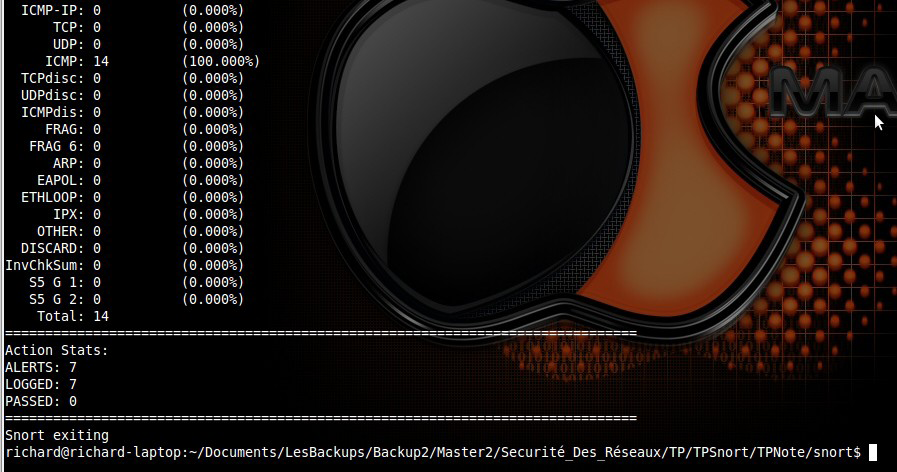
We note that the firewall has responded to the requests sent and also triggered alerts for each packet which is normal because only the external FTP requests are not alerted. For more information about cached packets, we can read the log from snort
/var/ log/snort /alert where we can see information on five packages.

Here is a sample of packet.

[**] [1:402:1] "EXTERNAL ACCESS ICMP [**]
[Priority: 0]
01/18-19: 29:31.414249 192168106128 -> 192168106179
ICMP TTL: 64 TOS: 0x0 ID: 0 IpLen: 20 DgmLen: 84 DF
Type: 8 Code: 0 ID: 25627 Seq: 10 ECHO

•    Ftp
Similarly, after running the command ftp -p 192,168,106,179  from an external machine with address 192.168.106.128.  We performed the same operations as previously.
Here are the statistics obtained from snort.

We note that the firewall has responded to all the requests sent without triggering no warning. This is normal.
•    Ssh
We here wanted to see the behavior of snort against another type of TCP packet
other than FTP. We attempt a connection to this server ssh at the firewall.

Here are the statistics obtained from snort.

We note that the firewall has responded to requests sent and also triggered alerts for each packet which is normal because only the FTP requests are not alerted from outside. We can also check the log and we will see packets of like this.
[**] [1:400:1] “EXTERNAL TCP ACCESS” [**]
[Priority: 0]
01/18-19:47:22.618458 192.168.106.128:47822 -> 192.168.106.179:22
TCP TTL:64 TOS:0x0 ID:57949 IpLen:20 DgmLen:60 DF
******S* Seq: 0x3045FB1A Ack: 0x0 Win: 0x16D0 TcpLen: 40
TCP Options (5) => MSS: 1460 SackOK TS: 399687 0 NOP WS: 6

Hence we can conclude that our firewall and the snort application runs
exactly as we wanted.

Conclusion
At the end of this work, which involved using the snort application to perform a basic detection of suspicious behavior in a network, it is clear that given the risk of leakage, securing a network is a task not taken lightly. In effect, with Snort, we can specify rules that allow us to analyze each packet entering the network and trigger alerts if necessary with specific messages describing the observed behavior. This is important for all network administrators because, this way they can have a global view of all transmissions performed within the network.

April 3, 2011

The Most Important Effects Of Information Technology On The Society


The aim of this report is to address the effects of Information Technology on the society. Technology is increasingly playing a crucial role in the success of organizations in the information age. The impact of Information Technology has been enormous on various domains like business, education, medicine etc... Computers and the information they process and store have transformed every aspect of the society. This rapid evolution of IT has good and bad impact on our everyday life. This paper will summarize the key aspects of human interaction and others domain that may be affected by the new technologies.

Introduction

Information technology (IT) is "the study, design, development, implementation, support or management of computer-based information systems, particularly software applications, computer hardware and mobile devices."IT deals with the use of electronic computers and computer software to convert, store, protect, process, transmit, and securely retrieve information. Many companies now have IT departments for managing the computers, networks, and other technical areas of their business. IT jobs include computer programming, network administration, computer engineering, Web development, technical support, and many other related occupations.

Since we live in the "information age," information technology has become a part of our everyday lives, that's why the purpose of this article is to look at the impact of information technology on our society. Knowing that any invention has advantages and drawbacks, we are specifically interested to the most important effects of information technology on any aspect of the society.

To reach this goal, we will firstly present information technology and its different characteristics, then we will investigate the actual effect of IT by stating some arguments for and then against IT and finally we will make a little summary just to say that, despite some remarkable drawbacks, IT is very necessary because there are many tasks that would be impossible without the use of IT. Air-traffic control, credit cards, space travel and medical research are just some examples.

Information Technology

Information technology is comprised of computers, networks, mobile and wireless devices, satellite communications, robotics, videotext, cable television, electronic mail ("e-mail"), electronic games, and automated office equipment. The information industry consists of all computer, communications, and electronics-related organizations, including hardware, software, and services. Completing tasks using information technology results in rapid processing and information mobility, as well as improved reliability and integrity of processed information.

There have been tremendous changes in the ways people live, work and play over the past three decades. The past ten years or so have seen changes at a much faster pace. Technological innovation and entrepreneurship have been the key players in promoting these changes. The rapid pace at which IT is changing means five to ten years from now lifestyles will be a lot different from what they are today. Nowadays we have some very good products both in the hardware industry and in the application industry. Companies like, facebook, google and twitter have completely revolutionized how people communicate and share information. In the device world we have big industries like Microsoft, apple and Samsung that are paving the way for the future generation by introducing revolutionary devices and applications.

Advantages Of Information Technology

Everyday, people use technology in new ways. Computers are increasingly affordable; they continue to be more powerful as information-processing tools as well as easier to use. Some of the advantages of information technology include:

Globalization - IT has not only brought the world closer together, but it has allowed the world's economy to become a single interdependent system. This means that we can not only share information quickly and efficiently, but we can also bring down barriers of linguistic and geographic boundaries and countries are able to shares ideas and information with each other.

Communication
- With the help of information technology, communication has also become cheaper, quicker, and more efficient.  The internet has also opened up face to face direct communication from different parts of the world thanks to the helps of video conferencing. Many collaboration platform have been built in addition to face to face call via mobile devices like iphone.

Cost effectiveness - Information technology has helped to computerize the business process thus streamlining businesses to make them extremely cost effective money making machines. This in turn increases productivity which ultimately gives rise to profits that means better pay and less strenuous working conditions.

More time - IT has made it possible for businesses to be open 24 x7 all over the globe. This means that a business can be open anytime anywhere, making purchases from different countries easier and more convenient.

Creation of new jobs
- Probably the best advantage of information technology is the creation of new and interesting jobs. Computer programmers, Systems analyzers, Hardware and Software developers and Web designers are just some of the many new employment opportunities created with the help of IT.

Inconveniences  Of Information Technology   

Some disadvantages of information technology include:

Unemployment - While information technology may have streamlined the business process it has also created job redundancies, downsizing and outsourcing. This means that a lot of lower and middle level jobs have been done away with causing more people to become unemployed.

Privacy - Though information technology may have made communication quicker, easier and more convenient, it has also bought along privacy issues. From cell phone signal interceptions to email hacking, people are now worried about their once private information becoming public knowledge.

Lack of job security - Industry experts believe that the Internet has made job security a big issue as since technology keeps on changing with each day. This means that one has to be in a constant learning mode, if he or she wishes for their job to be secure.

Dominant culture - While information technology may have made the world a global village, it has also contributed to one culture dominating another weaker one. For example it is now argued that US influences how most young teenagers all over the world now act, dress and behave. Languages too have become overshadowed, with English becoming the primary mode of communication for business and everything else.

Information Technology In Some Domains

In summary, one can easily see that computer related technologies have a strong impact on the world. These have attracted many students and professionals to the field of information technology. There are thousands of fields that use these technological opportunities in other to boost work's cost effectiveness. These fields include:

 Business - One of the first and largest applications of computers is keeping and managing business and financial records. Similar programs and databases are used in such business functions as billing customers; tracking payments received and payments to be made; and tracking supplies needed and items produced, stored, shipped, and sold. In fact, practically all the information companies need to do business involves the use of computers and information technology.

Medicine - Information technology plays an important role in medicine. For example, a scanner takes a series of pictures of the body by means of computerized axial tomography (CAT) or magnetic resonance imaging (MRI). A computer then combines the pictures to produce detailed three-dimensional images of the body's organs. In addition, the MRI produces images that show changes in body chemistry and blood flow.

 Science and Engineering - Using supercomputers, meteorologists predict future weather by using a combination of observations of weather conditions from many sources, a mathematical representation of the behavior of the atmosphere, and geographic data. Computer programs make it possible for engineers to analyze designs of complex structures such as power plants and space stations.

 Education - The technology available today has made a wealth of knowledge available to students, which offers great potential for the speed and style of learning. Information is presented in so many ways that any type learner, whether gifted or disabled, can find and use the necessary material. With e-learning the information on the Internet is available for all who have access, without discrimination.

Conclusion

At the end of this report, with the objective to present the information technology and to study the impact of these new technologies to the society, it is clear that the computer age is here; this cannot be debated. In many aspect of our society, we found IT efficient in solving complex problems at a very small type. It can perform enormous number of functions and operations that human cannot do. As result of the use of IT we can have cost effectiveness, globalization, communication and new jobs creation. Despite all these advantages, the IT world faces some remarkable disadvantages; privacy of information is an issue but the most important drawback is unemployment because many task initially done by human, are now done by computer. Nonetheless, it is said that in some scopes like education, technology can enhance traditional methods of learning but cannot replace the human touch.